Dropbox: File Syncing, Revisions, Photo Albums
August 7, 2008 – 9:06 am by Gabe Anderson | 6 CommentsSimilar to FolderShare, which I wrote about yesterday, Dropbox also allows you to sync files in a folder between computers and access them online. Unlike FolderShare, though, Dropbox has some cool added features:
- Public link sharing to share any file with anyone
- 2 GB of free online storage space for public shares
- Photo album sharing & viewing

Dropbox is a great way to quickly share any file — small or large — with anyone. Let’s say I want to share the downloadable Articulate Presenter help documentation with you. Here’s what I’d do:
- Copy (or move) the file from my computer into my Dropbox -> Public folder (on my Vista machine, the path is C:\Users\gabe\Documents\My Dropbox\Public).
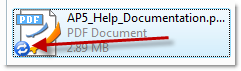
- Once I drop the file in my public Dropbox, I’ll see a blue icon indicating that it’s syncing to the Dropbox servers:
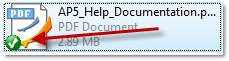
- When the icon changes to a green checkbox, I’ll know the file is on the server and ready for sharing:
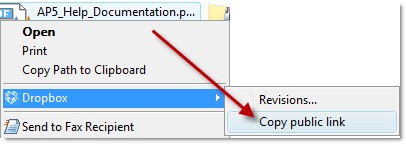
- Next, I right-click the file and select Dropbox -> Copy public link to copy the link to my clipboard:
- Finally, I give you the link (here on my blog, via email, or in an IM). The link looks like this:
And there you have it: An easy way to share big files — that might be too big for email — with friends or colleagues!
The revision feature of Dropbox is great, too — so that if you accidentally overwrite a file on your computer or decide you want to rollback changes, you can restore an older revision via Dropbox.
You can currently sign up for the Dropbox beta (and watch their intro video) on the Dropbox site, but you’ll get in right away if I invite you, so let me know if you want an invite.
(Thanks, Tom, for the Dropbox heads-up and invitation!)
[ Subscribe to gabeanderson.com via email or RSS feed. ]
 Hi, I'm Gabe Anderson. I've published more than 2,000 personal and professional blog entries on my other blogs since 2000.

6 Responses to “Dropbox: File Syncing, Revisions, Photo Albums”
Nice post, congratulations! Dropbox is very good.
By rodrigo lopes on Mar 23, 2009
Hi Gabe – Do you know if I can use DropBox to house all my AP/QM files that I publish to AO? This would cool so others can edit the files…
By Brent on Feb 25, 2010
Hi Brent- thanks for asking. I assume you’re referring to storing your source Articulate project files in Dropbox? Sure, you could definitely do that – it’d be a great way to keep your project files safe (since Articulate Online only hosts the published output).
Here’s another good way to create a backup archive of your source project files: Send to Articulate Presenter Package. Then you could store that zip file in your Dropbox account.
By gabe on Feb 25, 2010
Hi Gabe – Thanks for getting back to me. We have about 225 content items on AO and have always struggled with the ability to share and co-develop courses (we have developers all over the world). We may use dropbox to be the location for storing and publishing our Articulate content. Right now we all publish our Articulate content which is stored on our hard drives. Since Articulate does best when publishing from hard drives, I thought this would be a great way to collaborate on courses. This also avoids sending “project files” back and forth…
Does this make sense? Or do you have another recommendation (FYI, we do not work of network drives).
Brent
By Brent on Feb 26, 2010
Hi Brent- yes, I do think that would be a great solution for storing and collaborating on the source files since Dropbox, as you say, allows sync of local files on local hard drives (where Articulate performs best) – not to mention the backup on the Dropbox site.
You might also consider Windows LiveSync, formerly FolderShare, which I wrote about previously here.
By gabe on Feb 26, 2010
Thanks Gabe…I always appreciate your insights…
Have a great weekend!
Brent
By Brent on Feb 26, 2010