How to Hide the Firefox Downloads Status Window
April 7, 2008 – 8:52 am by Gabe Anderson | 12 CommentsI don’t know about you, but when I download something, I just want to click a link, have the file or application download, then get to it when I’m ready to open the file or launch the application. If I’m downloading a large file, especially, I don’t need to watch the status. I’d rather get back to work on other stuff and I certainly don’t need to see this window:

Hiding this status window is as easy as 1, 2, 3 (4, 5):
- Open up a new tab in Firefox (control-T, as you might recall from my earlier post on Firefox shortcuts).
- Type about:config into the address bar and hit Enter.
- In the Filter field at the top, type download:

- Look for the option called browser.download.manager.showWhenStarting (you can also filter for exactly that phrase).
- Double-click that option and the value will change to false:
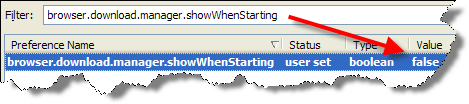
That’s it! Next time you download a file, you don’t have to worry about the annoying status box, but you can check on it at any time by pressing control-J to open the window.
[ Subscribe to gabeanderson.com via email or RSS feed. ]
 Hi, I'm Gabe Anderson. I've published more than 2,000 personal and professional blog entries on my other blogs since 2000.

12 Responses to “How to Hide the Firefox Downloads Status Window”
Firefox 3 lets you do this in the Tools>Options>Main, just uncheck the “Show the Download Window…”. And the only notification you get is in the status bar telling you how many are in progress and how long remaining.
You can check the window by either control-J, selecting “Downloads” from the tools menu or double clicking on the status bar entry.
And you can hide the window again by using “Control-J” again.
By DngnRdr on Jul 27, 2008
Thanks for sharing the tips, DngnRdr!
By gabe on Aug 7, 2008
Yep, Tools>Options>Main (Toggle Ctrl+J) to view works really well … THANKS!!!
By Aaron Wilson on Sep 5, 2008
Thank you for sharing your tips!! Pls keep up good work 🙂
By nyomya on Mar 26, 2009
finally!! thank you.
By Bob p on May 8, 2009
Does the download will stop when i close firefox?
By Jomz on Nov 3, 2009
Hi Jomz- yes, you can’t download something if your browser isn’t open (unless you’re using something like Internet Download Manager, which is a separate application).
By gabe on Nov 3, 2009
Thanks. Very helpful.
By Serg on Aug 28, 2012
Thanks, exactly what I needed!
By Yogesh Jindal on Nov 27, 2012
Thanks a lot, just what I needed. It was beginning to really annoy me having that page popping up all the time.
By Graham Bromley on Mar 1, 2013
hi tried that about:config route for turning off the notification alert that tells you the download has finished. i keep trying this and it does not automatically stay so i have to go back and try again to change the true to false… this does not work, is there something different or change for this problem in about:config for stopping the annoying pop up notification
By mur on Apr 24, 2014